ClefTunes for iPad1.6
Publisher Description
*** Help us by making a YouTube video showing off ClefTunes, and make some money! Details: http://bitsonthego.com/2010/04/17/cleftunes-youtube/ ***
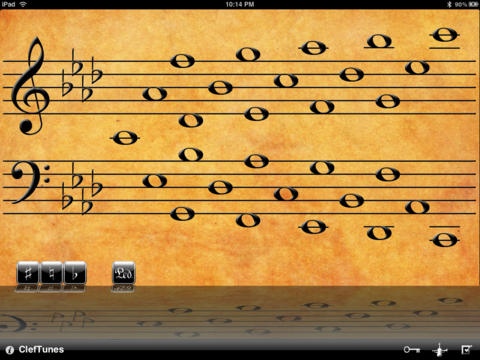
ClefTunes lets you play music using beautifully and richly synthesized instruments. ClefTunes uses a musical staff metaphor for tapping out a tune. Unlike musical keyboards, ClefTunes forces you to learn the location of the notes you play on the staff, and to associate the pitch with that note.
This app is a must have for all music students, and it is also a great way to spend time as you try to recreate your favorite tunes, by tapping them out.
Virtual Instruments that are included:
Celesta
Cellos
Clarinet
Classical Guitar
Flute
French Horn
Grand Piano
Harp
Harpsichord
Soprano Saxophone
Steinway Piano
Tenor Saxophone
Violin
Instrument files available for download (paid customers only):
Alto Saxophone
Applause & Laughter
Bagpipes
Bansuri Flute
Baritone Saxophone
Bass
Bass Pizzicato
Bass Staccato
Cello Pizzicato
Cello Staccato
Celtic Harp
Choir Ensemble
Choir Ensemble Female
Choir Ensemble Male
Comedy Noises
Di Zi Flute
Electric Guitar
Erhu Violin
Flamenco Guitar
Guzheng Zither
Indian Sitar
Irish Fiddle
Koto
Nature Sounds
Panpipes
Persian Santoor
Shakuhachi Flute
Shehnai Oboe
Soprano Saxophone
Tremolophone
Trombones
Trumpets
Tuba
Ukulele
Vibraphone
Violin Pizzicato
Violin Staccato
Xiao Flute
We hope you enjoy this app! Stay tuned as there are many features planned. Follow us in Twitter to influence the future direction of ClefTunes. (http://twitter.com/BitsOnTheGo)
Requires iOS 3.2 or later. Compatible with iPad.
About ClefTunes for iPad
The company that develops ClefTunes for iPad is Mahboud Zabetian. The latest version released by its developer is 1.6.
To install ClefTunes for iPad on your iOS device, just click the green Continue To App button above to start the installation process. The app is listed on our website since 2010-04-01 and was downloaded 19 times. We have already checked if the download link is safe, however for your own protection we recommend that you scan the downloaded app with your antivirus. Your antivirus may detect the ClefTunes for iPad as malware if the download link is broken.
How to install ClefTunes for iPad on your iOS device:
- Click on the Continue To App button on our website. This will redirect you to the App Store.
- Once the ClefTunes for iPad is shown in the iTunes listing of your iOS device, you can start its download and installation. Tap on the GET button to the right of the app to start downloading it.
- If you are not logged-in the iOS appstore app, you'll be prompted for your your Apple ID and/or password.
- After ClefTunes for iPad is downloaded, you'll see an INSTALL button to the right. Tap on it to start the actual installation of the iOS app.
- Once installation is finished you can tap on the OPEN button to start it. Its icon will also be added to your device home screen.
